

How Seedance 2.5 Is Changing the Way Creators Plan Short Videos
Short-form videos often look spontaneous, but a strong 20- or 30-second sequence usually begins long before generation.
Creators still have to decide what happens in the opening seconds, how a subject moves through the scene, where the camera should go, when an important reveal should happen, and how the final material will be edited together.
Trying to solve all of those questions inside one long prompt can work for experimentation. For more repeatable production, however, it helps to separate planning from generation.
A practical starting point is:
Idea → Scene Plan → References → Prompt → Generate → Review → Edit
The purpose of this workflow is not to make AI video production more complicated. It is to give every generation a clearer job.
Start With the Scene, Not the Prompt
Consider a simple project: a 20-second cinematic sequence showing a fictional character walking through a rain-soaked city at night.
Instead of immediately writing a detailed prompt, first decide what the viewer should experience.
The sequence might begin with an empty street reflecting neon signs. The character enters beneath an umbrella, notices something across the road, moves toward it, and finally reaches a destination that completes the visual idea.
That gives the project five useful story beats:
- Shot 1: Wide view of the rain-soaked street
- Shot 2: Character enters beneath the neon signs
- Shot 3: Closer view as the character looks across the road
- Shot 4: Tracking movement as the character moves forward
- Shot 5: Reveal of the destination
Importantly, this plan does not require the model to produce five perfectly separated shots in a single generation.
A creator could express these moments as timed beats within one continuous segment. Alternatively, selected moments could be generated separately, with the strongest candidates assembled later during editing.
The important part is not how many generations are used. It is that the sequence has a structure before generation begins.
Give Every Generation a Review Goal
Planning what should happen is useful. Planning how you will judge the result is even more useful.
For the rainy-city sequence, the creator might define:
- Creative intention: Build curiosity before revealing the destination.
- Continuity requirement: Keep the character’s clothing, umbrella design, nighttime environment, and overall atmosphere visually coherent.
- Timing requirement: Keep the destination unclear until the final part of the sequence.
- Review question: Does the destination reveal remain understandable without dialogue?
- Failure condition: The character’s clothing changes noticeably, the destination appears too early, or the camera movement hides the reveal.
This creates a much more useful review standard than simply asking, “Does this look good?”
Every generation now has something specific to test.
A visually impressive result can still fail if it reveals information at the wrong moment or breaks continuity. A less spectacular result may actually be more useful if it serves the intended sequence.
Build References Around the Plan
Once the scene and review goals are clear, reference material becomes easier to organize.
For the rainy-city example, a creator might prepare:
- Character reference: An approved synthetic or illustrated character with clearly defined clothing and silhouette
- Environment reference: Original, company-owned, or properly licensed imagery establishing the wet street, neon lighting, and nighttime atmosphere
- Composition reference: Creator-owned or licensed material used to communicate framing and camera position rather than directly reproducing a protected film shot
- Motion reference: Material used to describe general walking pace or tracking behavior, not to recreate another creator’s work
- Audio reference: Rain, traffic, ambience, dialogue, or music for which the creator has the necessary usage and external AI-processing rights
Thinking about references this way turns them into production inputs rather than a folder of loosely connected inspiration.
Each reference should answer a question the scene plan has already raised.
If it does not help establish the subject, environment, composition, movement, timing, or sound, it may not need to be included.
Where Seedance 2.5 Fits Into the Process
This reference-first approach becomes more relevant when a generation system can work with several types of creative input.
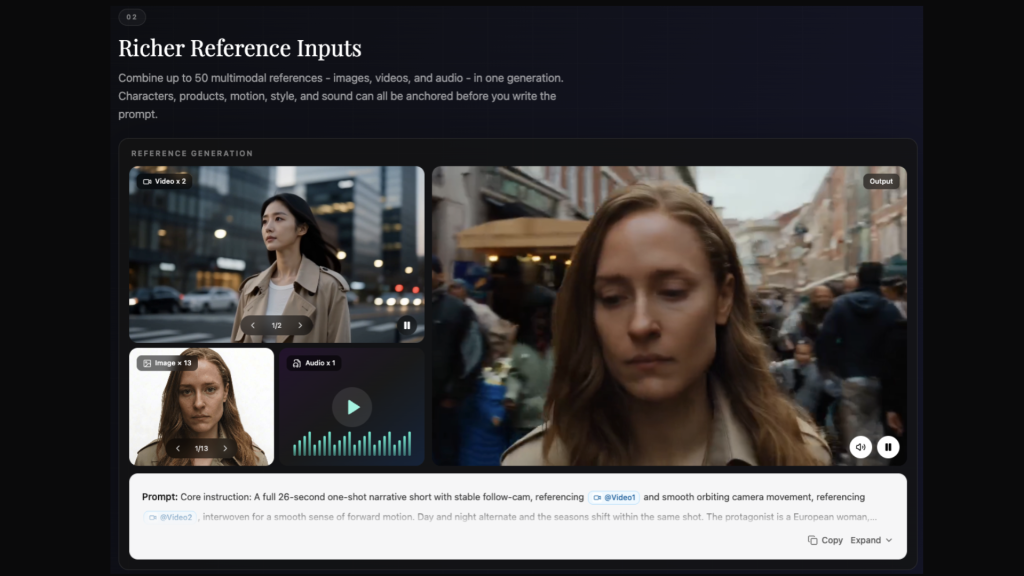
On JXP, Seedance 2.5 currently supports single-segment video generation of up to 30 seconds, up to 50 multimodal reference inputs, and more targeted post-generation refinement.
Those capabilities change what is worth preparing before generation begins.
Instead of trying to communicate an entire project through text alone, a creator can think about the project as a collection of purposeful inputs: scene instructions, approved visual references, motion guidance, audio, and the relationships between them.
More inputs do not automatically mean better output.
A collection of 20 carefully selected references may be more useful than 50 unrelated ones. The goal is not to reach the input limit. It is to give every reference a clear production role.
That makes preparation more important, not less.
Generate With the Edit in Mind
Return to the rainy-city example.
Suppose the overall sequence is promising, but the closer character moment does not work. Perhaps the timing feels wrong, a visual detail changes, or the movement makes the final reveal harder to understand.
The first response does not always need to be “regenerate everything.”
Seedance 2.5’s targeted refinement workflow is intended to help creators focus revisions on more specific problems without automatically treating every promising draft as disposable.
That does not mean a localized adjustment can be assumed to leave the rest of the result unchanged.
A targeted refinement may still affect continuity, lighting, movement, or nearby visual details. The full result should therefore be reviewed after every meaningful change.
A safer iteration loop looks like this:
Generate → Identify → Refine → Review → Compare
The “Compare” step matters.
Do not assume the newest version is automatically the best one. Compare it with the previous draft and ask whether the original problem was actually solved without creating a larger one elsewhere.
Treat Generation as One Stage of Production
AI generation is not the finished video.
Two individually strong moments may feel awkward when placed next to each other. A tracking movement may last too long. Music may require an earlier cut. Dialogue can change the timing of a reveal. Sound design can make an otherwise simple scene feel completely different.
For creators working with the JXP Seedance 2.5 AI Video Generator, it therefore makes more sense to treat generation as one stage within a broader production process rather than as the final step.
A practical workflow is better understood as:
Plan → Generate → Select → Edit → Refine
rather than:
Prompt → Generate → Done
This distinction is particularly important for short-form content. When the entire piece lasts only 20 or 30 seconds, even one unnecessary second can affect pacing.
Review the Sequence, Not Just the Image Quality
Visual quality is only one part of the review.
Return once more to the rainy-city sequence.
The creator can now evaluate the result against the original plan:
Does the opening establish the environment quickly enough?
Does the fictional character remain visually coherent?
Does the tracking movement naturally lead toward the final reveal?
Does the destination appear at the intended moment?
Does the sequence still make sense without an explanation outside the video?
These questions turn review into a production task rather than a reaction to whether a clip looks impressive.
A beautiful shot that breaks continuity may be less valuable than a simpler shot that supports the story.
That distinction becomes especially important when creators generate multiple alternatives. The goal is not necessarily to choose the most visually dramatic output. It is to choose the one that works best inside the finished sequence.
Better Tools Still Require Better Preparation
More capable generation tools do not eliminate planning.
In some ways, they make planning more valuable.
If a system can accept many references, the creator still has to decide which references are useful. If a particular region or moment can be refined, someone still has to identify what needs to change. If longer continuous sequences are possible, timing and structure become more important rather than disappearing.
The creative work gradually moves toward direction and selection.
Before generation, the creator defines the intention.
During generation, the model produces possibilities.
During review, the creator decides whether those possibilities actually serve the sequence.
During editing, the useful pieces become a finished video.
The technology can expand the number of possibilities available at each stage, but it does not decide which possibility best communicates the original idea.
Build a Workflow That Can Survive the Next Model
One of the advantages of planning AI video this way is that the workflow does not depend entirely on a single feature.
Models will change. Generation lengths will change. Reference systems will improve. Editing controls will become more precise.
The underlying production questions are more durable.
What should the viewer experience?
Which visual details must remain coherent?
What is each generation supposed to test?
Which references actually contribute useful information?
What would make a draft unusable?
Which version works best in the final sequence?
Creators who can answer those questions are building something more useful than a collection of prompts. They are building a repeatable production process.
Seedance 2.5 can sit inside that process as a generation and refinement tool, while the structure still comes from the creator.
That is perhaps the more meaningful way Seedance 2.5 is changing short-video planning: not by removing creative decisions, but by giving creators more reasons to make those decisions earlier, evaluate them more clearly, and carry the strongest results into the final edit.